
Challenge
Enterprise customers were hitting a wall. As Drata moved upmarket, our target customer segment—enterprises with dedicated GRC teams—were abandoning our platform for workflow execution. They loved our monitoring capabilities but couldn't use Drata for their actual compliance processes.
What we heard
"We have to recreate all our workflows in Lucidchart because Drata doesn't let us configure anything"
"Your tool assumes one person does everything, but we have 15 people with different roles"
"We're paying for compliance automation but still doing everything manually"
Business risk
- $3M ARR at churn risk from enterprise accounts
- 10% enterprise deals stalled in pipeline due to workflow inflexibility
- Competitive pressure from tools like ServiceNow that offered configurability
Strategic Foundation
Before jumping into solutions, I knew we needed strategic guardrails. A full-featured workflow builder could easily balloon into a multi-year-long project. I initiated a conversation with our VP of Product to define what success looked like within our constraints.
Key questions I brought to leadership
- What does "visual" actually mean for a workflow builder?
- How much configurability is enough for enterprise without over-engineering?
- What's our MVP that unlocks the next tier of deals?
Strategic principles we aligned on

Visual-first design
Non-linear relationships must be clearly identifiable. Users should see how everything connects at a high level.
Role-based, not user-based
Scale for organizational change without breaking workflows. Avoid single points of failure when people leave.
Guided flexibility
Prevent customers from over-complicating their own systems. Provide templates and best practices, not a blank canvas.
Solution
A scalable, visual workflow builder. The final design enables compliance teams to configure workflows that match their organizational processes while maintaining guardrails that prevent over-complexity.
Three-part structure
Hover a card to see the design rationale

The compliance objects that originate workflows (Controls, Policies, Evidence, Vendors, etc.)

Object-specific events that initiate a workflow:
- Control assigned
- Evidence request sent
- Policy review date reached
- Vendor risk score changes
Modular actions that can be added, reordered, and configured:
- Assignments - Route to specific roles or teams
- Notifications - Alert stakeholders via email, Slack, or in-app
- Approvals - Require sign-off before proceeding
- Conditionals - Branch based on criteria (risk score, object status, etc.)
- Integrations - Trigger external systems (Jira, ServiceNow, etc.)
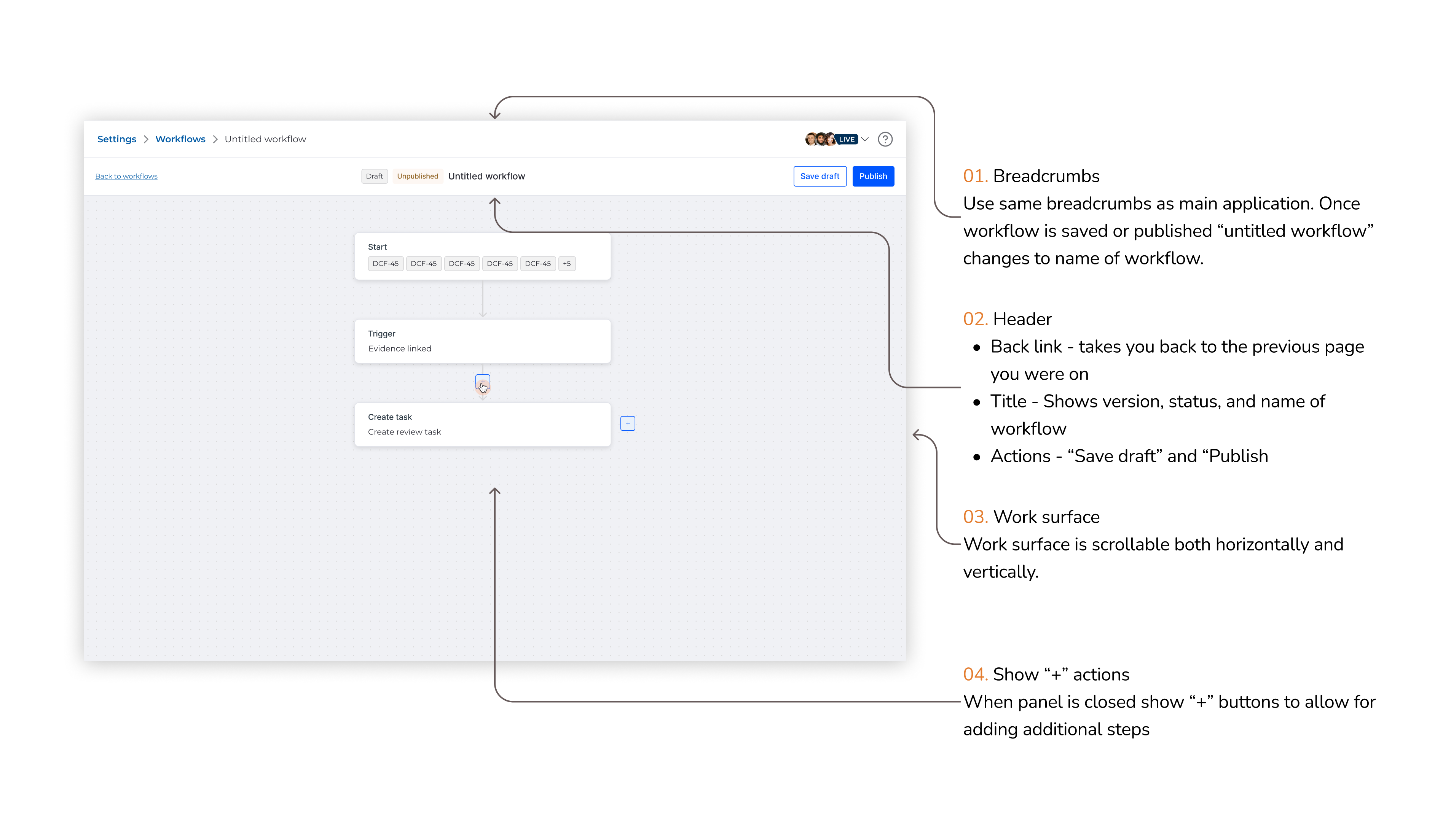
What this enables
- Scan the entire process at a glance
- Identify bottlenecks where steps might pile up
- Trace paths through conditional branches
- See parallel processes when workflows split
How it works
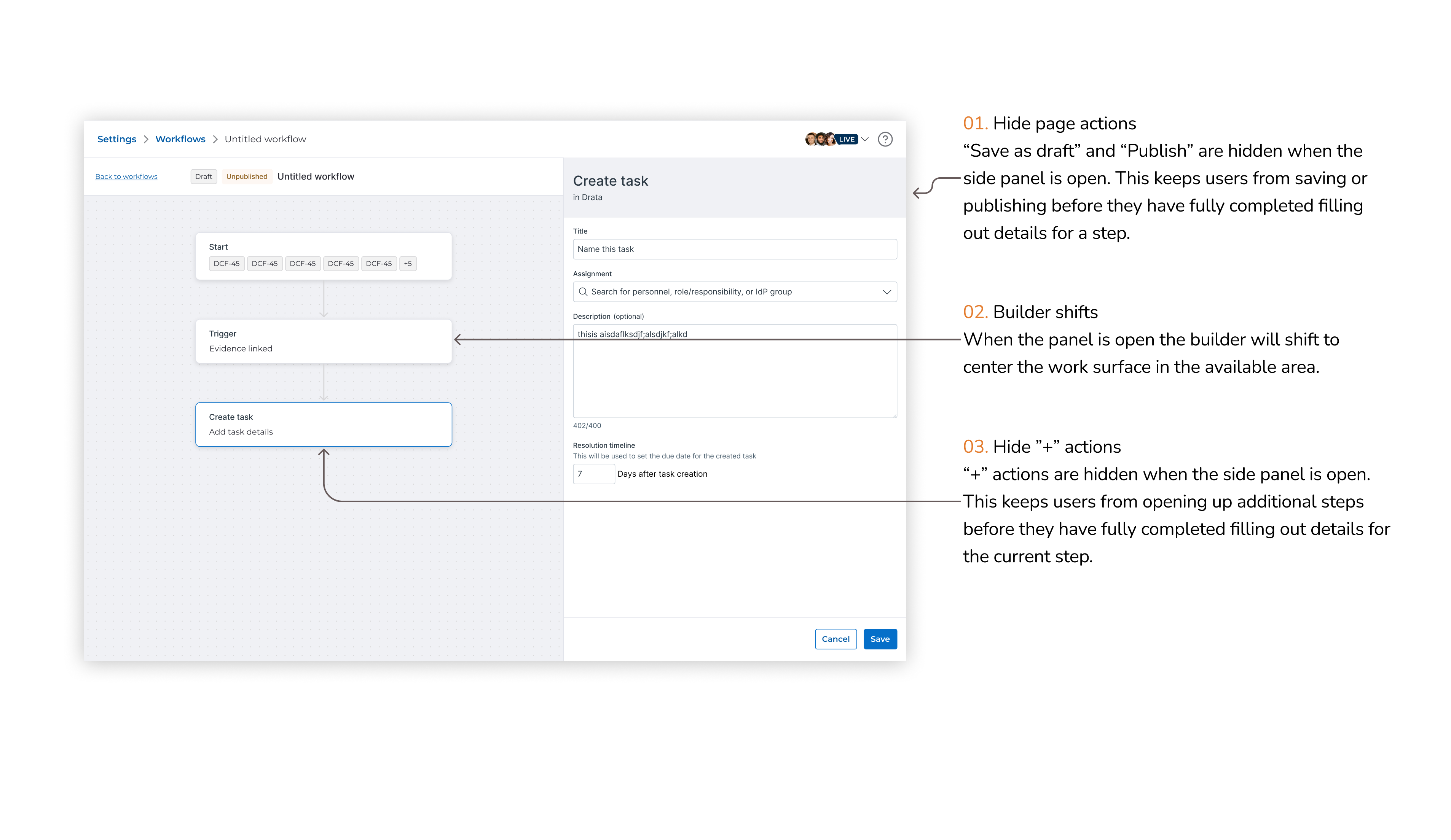
- Connector lines show how the workflow is flowing and where parallel runs may be occurring
- Hover states preview step details without opening configuration panel
In-context workflow status
For each workflow, I designed how steps appear within the compliance objects themselves because users shouldn't have to leave their work context to understand workflow status. Bringing workflow visibility into objects reduces tool-switching and increases trust that automation is working.
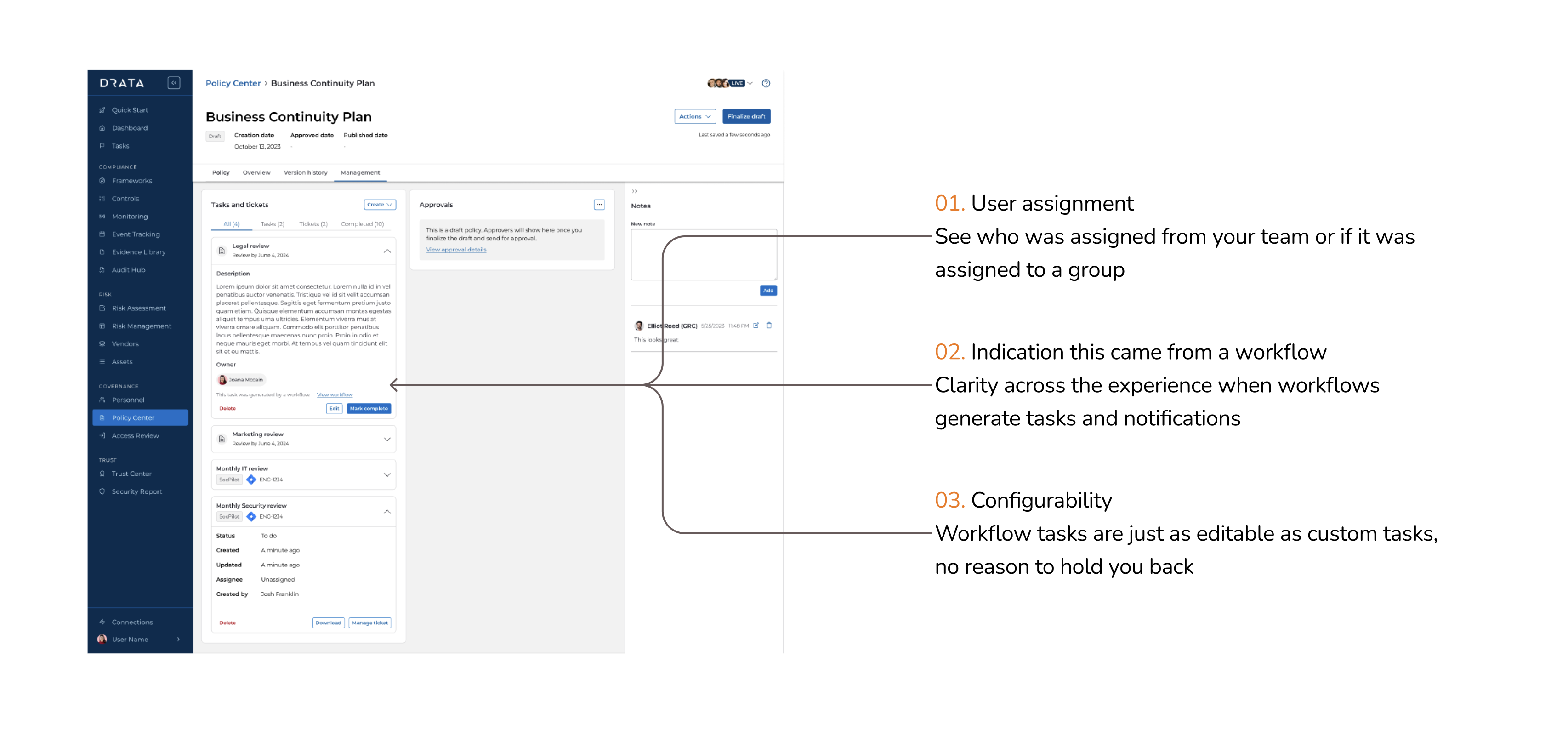
Status indicators show
- Current step in progress
- Who is assigned (with profile picture and role)
- When action was last taken
- What's blocking progress (if anything)
Activity feed shows
- Step completed with timestamp
- Who completed it
- What changed as a result
- Next step triggered
Workflow runs dashboard
A centralized view for admins to stay on top of everything in their compliance program. While individual contributors see workflows in context, compliance managers need a "control tower" view to ensure nothing falls through the cracks.
Admins are able to
- See all active workflows across the organization
- Filter by status, assignee, or object type
- Identify stalled workflows requiring intervention
- Export workflow data for reporting
Workflow Runs Dashboard - Showing overview of all active workflows with filters and status
Collaboration note
For this specific segment of the project, I was pairing with one of my direct reports as part of his growth into platform-level product ownership — he led much of the work on the Workflow Runs Dashboard.
Impact & Outcomes
0
Enterprise deals closed
0%
Increase in ACV
0
Workflows built in 90 days
0%
Enterprise adoption rate
What customers said
"This is the first time Drata has actually adapted to how we work instead of forcing us to adapt to Drata."
— VP of Compliance, Fortune 500 Financial Services
"We migrated 5 manual workflows into Drata in one week. This changes everything."
— Director of GRC, Series D SaaS Company
"Finally. This is what we've been asking for since day one."
— CISO, Enterprise Healthcare Customer
Discovery
Competitive Analysis
I conducted a comprehensive competitive analysis of workflow builders across categories—from no-code automation (Zapier, Tines) to enterprise workflow tools (ServiceNow, Jira) to diagramming tools customers were already using (Lucidchart, Miro).
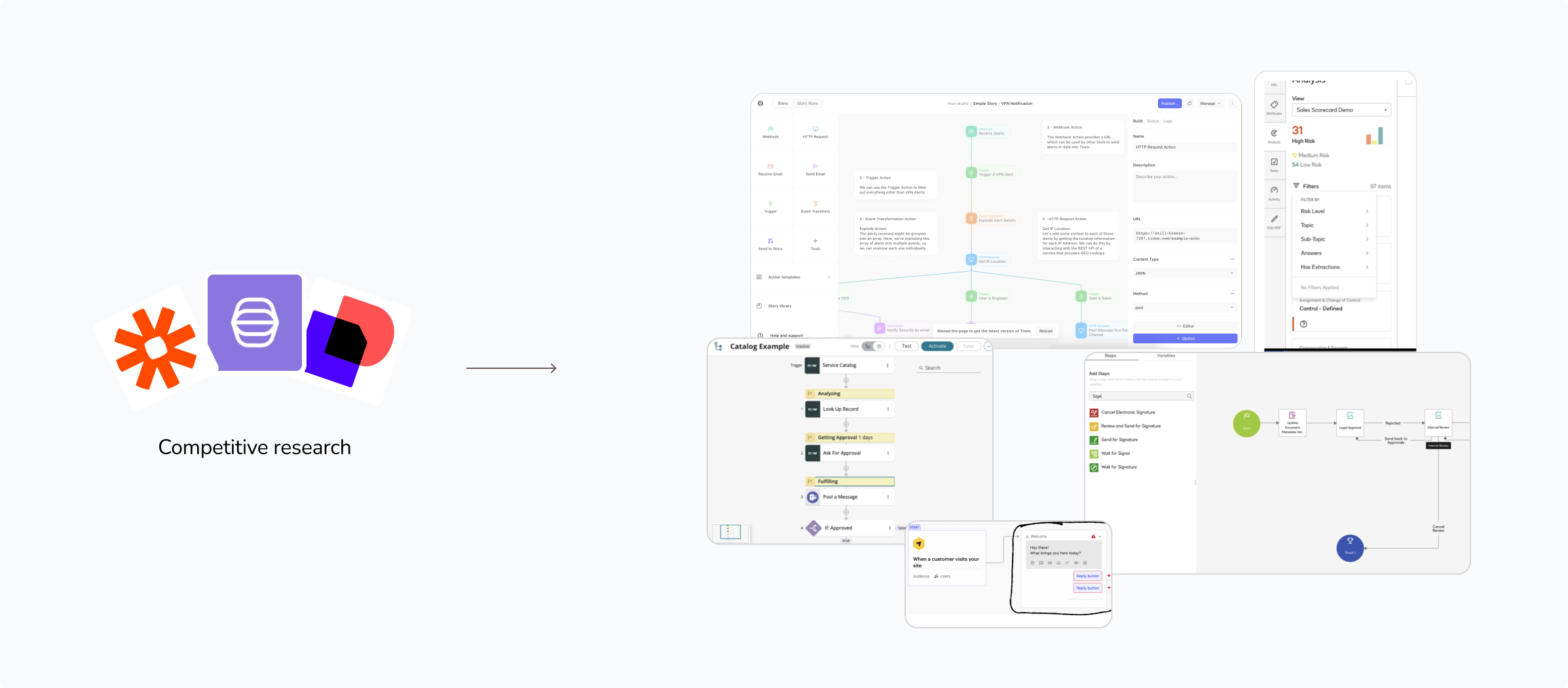
Competitive Analysis Grid
Key patterns identified
- Navigation often collapses to maximize canvas real estate
- Right-side panels enable deep configuration without cluttering the canvas
- Visual connectors (lines/arrows) show relationships between steps
- Conditional logic displayed inline with AND/OR branches
- Read/write modes separate viewing from editing to reduce cognitive load
This became our "inspiration board" that I referenced throughout the project whenever we faced design or feasibility questions.
User Research
Given the engineering investment required, I pushed for two dedicated research sprints to validate our approach before committing to build.
Round 1: Concept Testing (3 concepts)
I designed three concepts representing different levels of configurability. We tested with 8 target customers: enterprises with 50+ employees and dedicated compliance teams.
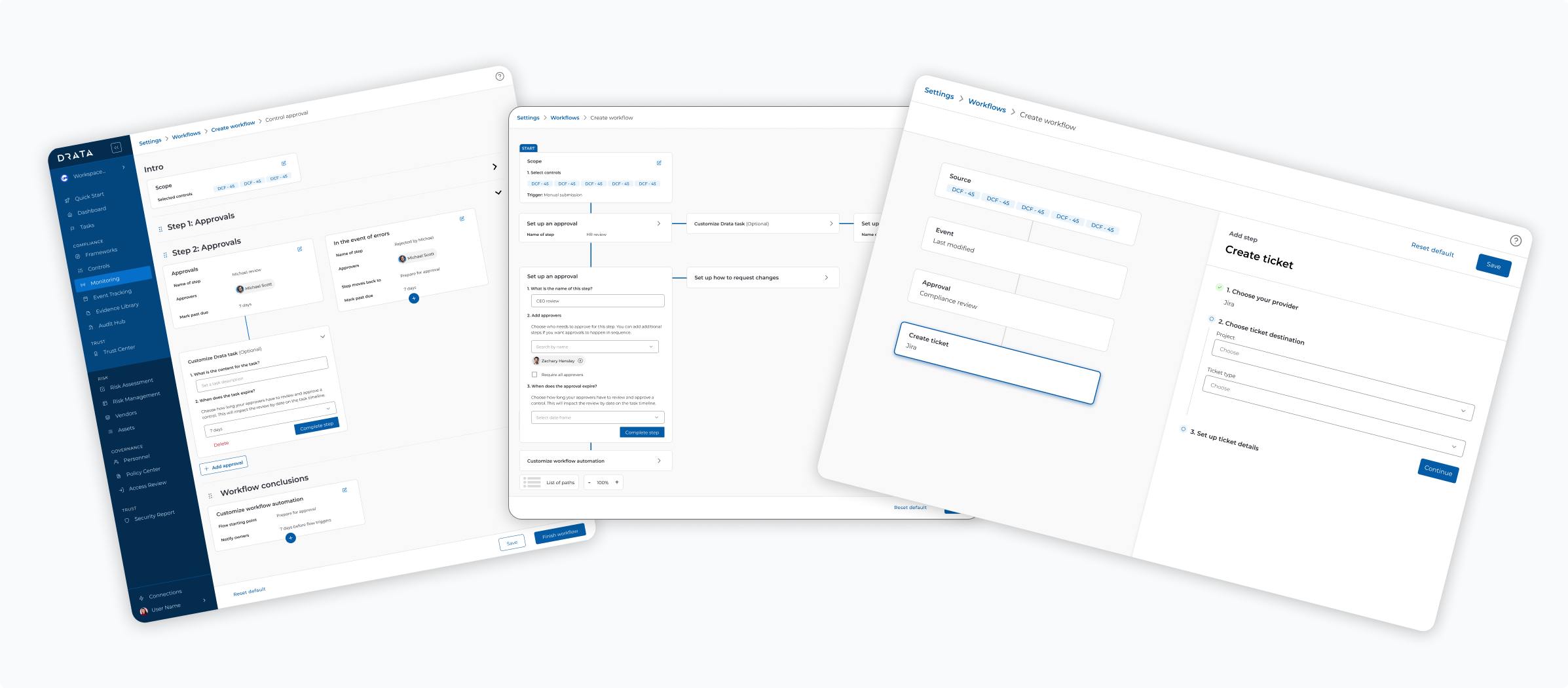
Three Concepts Comparison - Side-by-side showing: Concept A: Template-based (low config), Concept B: Modular builder (medium config), Concept C: Drag & drop builder (high config)
What we learned:
Concept C (Drag & Drop) hit the sweet spot—flexible enough for complex processes, structured enough to prevent chaos. Concepts A and B felt "too rudimentary for what we need"
Round 2: Evaluative Research
With our direction validated, I built a high-fidelity prototype of the modular builder and tested with 6 different customers, focusing on usability and completeness.
The core concept held up well — customers could configure workflows without guidance and understood the role-based model intuitively. The sessions also surfaced four key insights that shaped the final design:
People change roles every 6-12 months here, but the compliance program stays the same. If we build this around specific users, it breaks constantly.
Role-based model prevents single points of failure
Built assignment system around roles (e.g., "Security Engineer," "Compliance Manager") not individuals. Created role management system where admins can map people to roles. Workflows automatically route to whoever currently holds that role.
I need to see the whole workflow at once. We've already documented this in Lucidchart—your tool should match how we think about it.
Visual relationships create clarity and trust
Node-based canvas with visual connectors showing step relationships. Breadcrumb navigation to show context when editing individual steps. Matching the visual language customers already use in their documentation.
The workflow builder doesn't matter if people don't know when it's their turn. We need to see status in the tools we already use.
Communication breakdowns cause workflow failures
Designed in-context status indicators within compliance objects themselves. Created notification system that surfaces in Slack, email, and in-app. Built "workflow runs" view showing all active workflows and their current step. Added "waiting on" indicators so stakeholders know who has the ball.
We have engineers who could write custom integrations if you let us.
Technical users want code-level control
Noted as future enhancement. Our MVP focuses on visual builder, but we architected the system to support API-based workflow creation in future releases.
Reflections
This was the longest and most complex project I've worked on — nine months of navigating competing priorities, engineering constraints, and enterprise customer demands that kept evolving. What I'd carry forward most isn't any single design decision, but the discipline of setting strategic guardrails before touching Figma.
Early on, I initiated a conversation with our VP of Product to define what "configurable workflows" actually meant within our constraints. That conversation shaped everything. Without it, we could have spent months designing toward a full no-code automation platform — technically impressive, but years away from shipping. Defining the boundaries early kept the team from scope creep and gave me the foundation to push back confidently when requests came in that didn't fit the MVP.
The role-based assignment model was an insight I didn't anticipate going in. It came directly from research — users kept describing their compliance teams as fluid, with people moving in and out of roles constantly. Designing around roles instead of individuals felt like a small implementation detail at first, but it turned out to be the unlock that made enterprise scalability real. It's one of those decisions that looks obvious in retrospect but required listening deeply to uncover.